Image to laser-ready SVG
with auto bridge generation
BridgeIt removes backgrounds, traces clean vector outlines, detects floating islands, and automatically adds bridge tabs so your laser cut design stays in one piece. Export as SVG for LightBurn or DXF for Fusion 360 and FreeCAD.
Free · v1.6.6 · Windows, macOS & Linux · Download. Extract. Done.
macOS: Apple Silicon (M1+) only · right-click → Open on first launch
BridgeIt is a free desktop application for Windows, macOS, and Linux that converts images into fabrication-ready cut files for laser cutting. It automatically removes the image background, traces smooth vector contours, detects floating islands — interior pieces that would fall away when cut — and adds bridge tabs to keep them connected to the surrounding material. Export as SVG for LightBurn, RDWorks, and LaserGRBL, or as DXF for CAD tools like Fusion 360, FreeCAD, and AutoCAD. No subscription, no watermarks, no account required.
See it in action
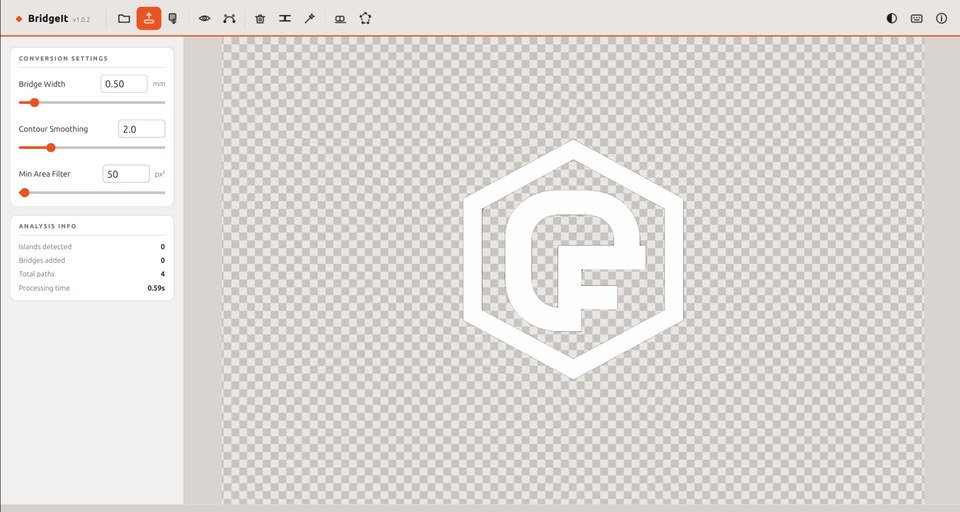
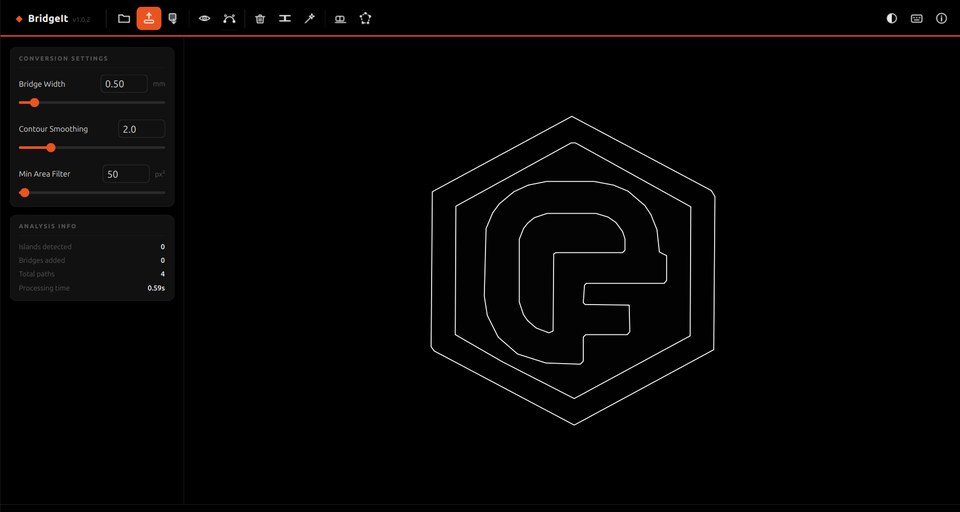
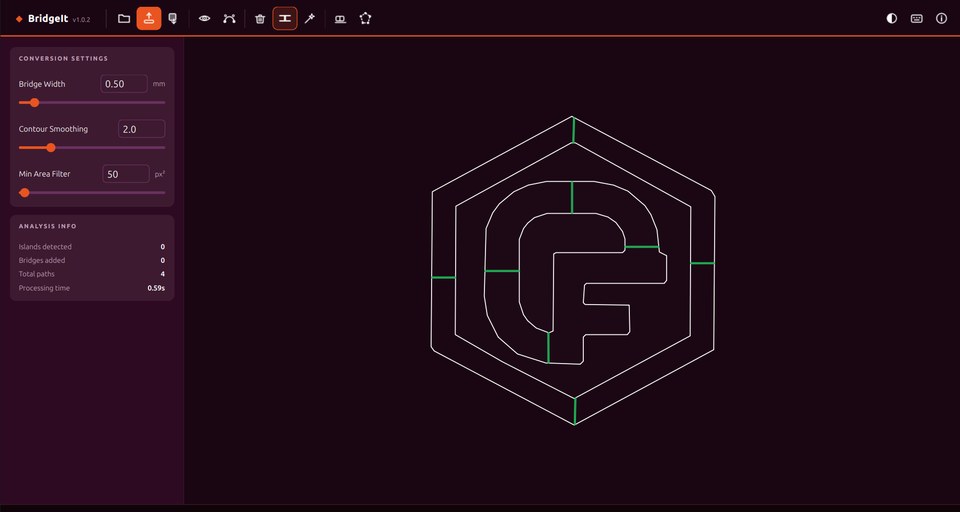
Drop in any image — background removed, paths traced, bridges placed in seconds.
Everything you need
AI Background Removal
Removes backgrounds automatically with a single click. Manual erase and lasso tools for tricky edges.
Smooth Vector Tracing
Traces your design into clean, smooth cut paths ready to drop straight into your laser software.
Auto Bridge Generation
Detects floating islands and suggests bridge tabs automatically. Review and confirm before exporting.
Image SVG Export
Export a filled, colored SVG matching the original artwork, perfect for vinyl cutting or print.
Cut-Path SVG Export
Stroke-only paths ready for LightBurn, RDWorks, or any laser cutter software.
DXF Export for CAD
Export a CAD-ready DXF file that imports cleanly into Fusion 360, FreeCAD, AutoCAD, and SolidWorks with correct physical dimensions.
Dark, Light & OLED Themes
Three built-in themes. Automatically matches your OS dark/light mode preference.
Real output, straight from BridgeIt
This SVG was generated in seconds from a photo of Tux — background removed, contours traced, ready to cut.

Exported SVG · single path · fabrication-ready
How it works
Open an image
Drop in any PNG, JPG, or SVG. BridgeIt shows the original immediately while processing in the background.
Background is removed automatically
The background is removed automatically. Use the Erase or Lasso tools to clean up any remnants.
Review bridges
BridgeIt highlights floating islands and suggests bridge placements. Delete unwanted ones, add your own, then confirm.
Export and cut
Export as SVG for LightBurn and other laser software, or as DXF for Fusion 360, FreeCAD, and AutoCAD. Done.
Common questions
What is a floating island in laser cutting?
When you cut a shape that has a fully enclosed interior piece (like the counter of a letter O, or a logo with a hole in it), that interior piece is called a floating island. It has no connection to the surrounding material, so it falls away when cut. BridgeIt detects these automatically and adds thin bridge tabs that keep the island attached until you snap it free by hand.
What is a bridge tab in laser cutting?
A bridge tab (also called a micro-tab or bridge) is a small uncut section of material that connects a floating island to its surrounding piece. BridgeIt adds these automatically to your SVG cut paths so your design stays in one piece after cutting. You snap them off cleanly with a craft knife or your fingers.
Can I import BridgeIt output into Fusion 360 or FreeCAD?
Yes. Use the Export DXF button to save a CAD-ready DXF file. DXF is the native exchange format for Fusion 360, FreeCAD, AutoCAD, SolidWorks, and LibreCAD — it imports cleanly with correct physical dimensions in millimetres, no unit conversion needed.
Does BridgeIt work with LightBurn?
Yes. BridgeIt exports a standard SVG cut-path file that imports directly into LightBurn, RDWorks, LaserGRBL, and any other laser cutter software that accepts SVG files.
Can I use my own image or logo?
Yes, any PNG, JPG, or SVG. BridgeIt removes the background automatically, then traces the outlines as smooth vector paths. Works well with logos, clipart, photographs, and hand-drawn designs.
Is BridgeIt really free?
Yes, completely free with no feature limits, no watermarks, and no account required. If it saves you time, you can support development with a small donation, but there's no obligation.
Does it work on Mac and Windows?
Yes — Windows, macOS (Apple Silicon M1 and later), and Linux are all available. Download the right version from the links above. On macOS, right-click the app and choose Open the first time to bypass the unsigned app warning.
What are the system requirements?
Windows: Windows 10 or later, 64-bit. macOS: Apple Silicon (M1 or later). Linux: Ubuntu 20.04+, Debian 11+, Fedora 36+, or any modern 64-bit distribution. No additional software required.
Why is the download ~500 MB?
BridgeIt bundles everything it needs to run — the background removal model, all libraries, and the runtime — so there is nothing else to install. You download once and it works immediately, with no Python or dependencies required.
What's new
v1.6.6 — Cleaner bridge attachment
Bridge tabs now attach to the exact point on the path edge with no diagonal artifacts. Previously the bridge could snap to the wrong vertex and shoot a line off at an odd angle.
v1.6.6–1.5.3 — FreeCAD Draft-to-Sketch no longer crashes
DXF paths are now exported at 64 points per shape instead of 4000+. Same accuracy, but at a size FreeCAD and other CAD tools can handle without freezing.
v1.6.6 — Bridge pulling fixed
Bridge tabs no longer distort the surrounding path. Smoothing is applied before bridge geometry is inserted, so tabs are clean rectangular detours rather than pulling nearby lines inward.
v1.6.6 — DXF export for CAD
New DXF export button for Fusion 360, FreeCAD, AutoCAD, and SolidWorks. Exports in millimetres with correct physical dimensions — no unit conversion needed.
v1.6.6 — FreeCAD SVG compatibility
SVG files now include physical millimetre dimensions in the header, fixing the "doesn't contain absolute units" error in FreeCAD and other CAD tools.
Free · v1.6.6 · Windows, macOS & Linux · Download. Extract. Done.
BridgeIt is free, forever.
If it's saved you time on a project, a small donation goes a long way toward keeping it maintained and improving it.
Support BridgeIt on Ko-fiGot feedback?
Found a bug, have a feature request, or just want to share how you're using BridgeIt? Open an issue on GitHub. It takes 30 seconds.
Leave Feedback on GitHub